
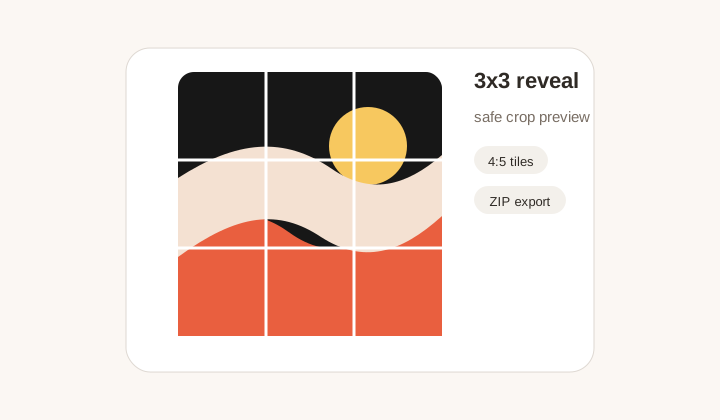
3x3 profile reveal
A campaign hero image cut into nine safe tiles, with a profile preview that helps prevent important details from landing on seams.
Instagram grid maker
Create 1x3 to 4x3 profile slices with safe crop previews, ZIP export, and posting order.
Fast presets for puzzle feeds, row banners, carousel covers, and extended story grids.
Grid layout
Layout
3 x 3
Slices
9 files
Post order
9, 8, 7
Upload an image to inspect the crop.
Exported 4:5 slices will appear here.
Posting order
Post in reverse order: 9 -> 8 -> 7 -> 6 -> 5 -> 4 -> 3 -> 2 -> 1. Instagram will rebuild the puzzle from left to right after the final upload.
Workflow
An Instagram grid maker turns one large visual into smaller posts that rebuild the image on your profile. The difficult part is not only cutting the image; it is choosing a layout that still looks good after Instagram crops, spacing, and posting order. GridMaker focuses on that practical workflow. Upload a campaign image, choose 1x3, 2x3, 3x3, 4x3, or another preset, preview the safe area, then export each tile or download everything in one ZIP.
A campaign hero image cut into nine safe tiles, with a profile preview that helps prevent important details from landing on seams.
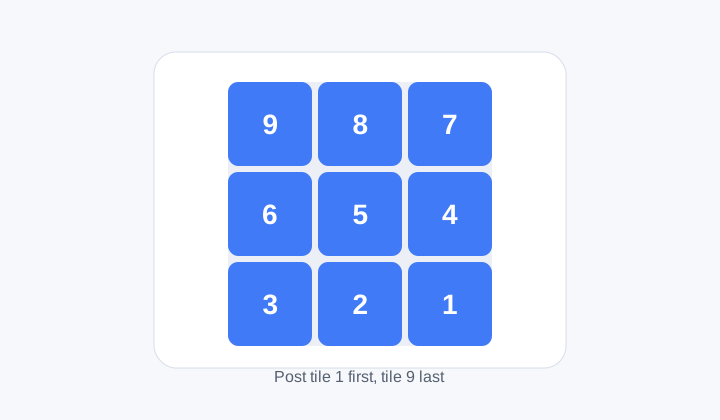
A numbered sequence showing how the exported tiles should be posted so the profile grid resolves correctly.
Profile-first cutting
A puzzle feed can look impressive when all tiles are visible together, but each tile also appears as a standalone post. GridMaker shows the slice plan before export so you can check whether faces, logos, product names, and call-to-action areas fall in acceptable places. Safe padding helps protect important content from being clipped awkwardly.
The presets cover common Instagram workflows: a single square, a three-post row banner, a 2x3 launch block, a 3x3 profile reveal, and extended 4x3 story-like layouts. Instead of manually calculating crop boxes, you choose the campaign shape and let the tool build the tile geometry.
This is especially helpful for brand work where the profile grid is only one part of the campaign. The same source image may also become a story, carousel cover, ad creative, or website hero. Previewing the grid early lets you decide whether the profile version needs its own crop before the content is handed to a scheduler.
Posting order
Instagram profiles fill from newest to oldest, which means grid tiles usually need to be posted in reverse visual order. GridMaker includes a posting sequence so the bottom-right tile can be published first and the final top-left tile lands last. That small detail prevents an otherwise correct grid from appearing scrambled on the profile.
The order also helps teams. A designer can prepare the ZIP, a social manager can follow the numbered tiles, and the brand profile receives the intended image without reopening an editor. Clear filenames reduce the risk of missing or duplicate uploads.
This matters most under time pressure. Launch posts are often prepared close to release, and a single wrong upload can make the profile look broken while followers are watching. A visible sequence turns the grid into an operational checklist. The person publishing does not need to understand the crop math; they only need to follow the tile numbers in order.
Export formats
JPG is usually efficient for photographic campaigns. PNG is better for graphics, text, logos, and sharp flat colors. WebP can reduce file size while keeping good quality in modern workflows. The tool lets you choose the format before rendering so the export matches your publishing or handoff needs.
Everything runs locally. That matters for unreleased campaigns, influencer posts, product launches, and client previews. The image is cut inside the browser and packaged with JSZip, so you can prepare a grid without sending the original file to a remote service.
Before publishing, open the exported tiles and scan them like followers will see them. A tile with only a background corner may be acceptable inside a puzzle, but a tile containing a cropped word, half a face, or unclear product detail may need a revised source image.
Workflow
Prepare profile-grid content with crop awareness, format control, and a posting sequence that social teams can follow.
No. GridMaker prepares the tiles and download package. You still publish them through Instagram, Meta Business Suite, or your scheduling tool.
Instagram places the newest post first. To rebuild a large image, you usually publish the final visual tile first and the first visual tile last.
Use 1x3 for banners, 2x3 for compact campaign blocks, 3x3 for classic profile reveals, and 4x3 when you need more vertical storytelling room.
Yes. After generating the grid, use Download ZIP to save all tiles with filenames that support the posting sequence.
The tool exports profile-ready slices, but Instagram interface changes and post settings can still matter. Preview the account before publishing a client campaign.
No. It also works for row banners, launch countdowns, profile covers, carousel source crops, and multi-post educational layouts.