
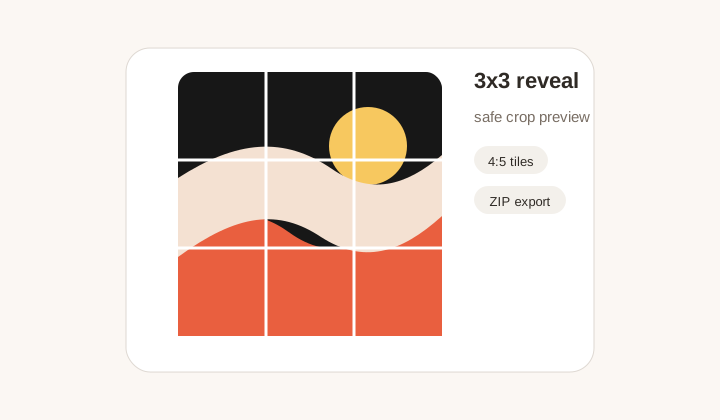
3x3 profile reveal
Campaign image cut into nine safe tiles with profile preview for checking seams.
Instagram grid maker
Gumawa ng 1x3 hanggang 4x3 profile slices na may safe crop preview, ZIP export, at posting order.
Fast presets para sa puzzle feeds, row banners, campaign launches, at story-like grids.
Grid layout
Layout
3 x 3
Slices
9 files
Post order
9, 8, 7
Upload an image to inspect the crop.
Exported 4:5 slices will appear here.
Posting order
Post in reverse order: 9 -> 8 -> 7 -> 6 -> 5 -> 4 -> 3 -> 2 -> 1. Instagram will rebuild the puzzle from left to right after the final upload.
Workflow
Instagram Grid Maker cuts one large visual into smaller posts that rebuild on your profile. Hindi sapat na basta hatiin lang ang image; kailangan ding tingnan ang safe crop, standalone look ng bawat tile, at tamang posting order. GridMaker gives presets, preview, ZIP export, and sequence guidance in one workflow.
Campaign image cut into nine safe tiles with profile preview for checking seams.
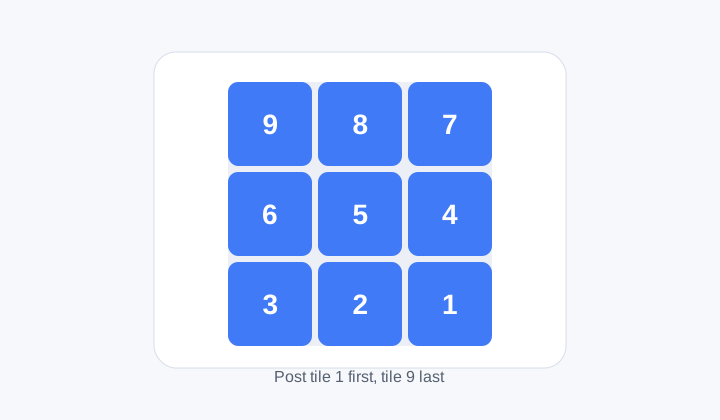
Numbered map that shows which tile should be posted first and last.
Profile first
Preview helps you check kung ang face, logo, text, o product detail ay nasa safe area at hindi napuputol sa seams.
Posting order
Latest posts appear first on Instagram, so tiles usually need reverse visual order. Numbered files help social teams upload correctly.
Formats
JPG works for photos, PNG for text and logos, and WebP for modern smaller files. The slicing happens locally in the browser.
Workflow
Prepare profile-grid content with crop awareness, format choice, and posting order.
Hindi. GridMaker prepares the files; you still publish through Instagram or a scheduler.
Because Instagram shows newest posts first, so the upload order affects the final profile layout.
1x3 for banners, 2x3 for compact campaigns, 3x3 for classic reveal, 4x3 for longer storytelling.
Oo. Use Download ZIP after generating the grid.
The tool exports profile-ready slices, but final post settings should still be checked.
Hindi. Useful din ito for row banners, countdowns, campaign covers, and educational layouts.