
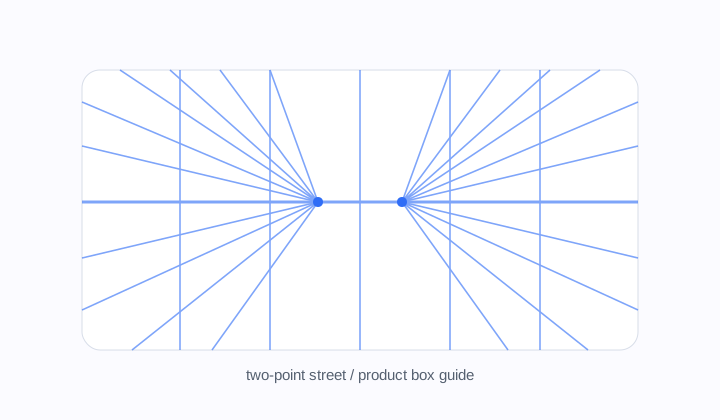
Two-point street guide
Street scenes، rooms، product boxes اور architectural corners کے لیے widescreen guide۔
Perspective grid
1-point، 2-point اور 3-point drawing guides بنائیں، canvas presets اور transparent exports کے ساتھ۔
Horizon height، vanishing points، guide density tune کریں اور reusable drawing overlay export کریں۔
Perspective type
Mode
two point
Canvas
16:9 Widescreen
Lines
105
two point grid, 16:9 Widescreen, 2 vanishing points, 105 guide lines. Transparent PNGs can drop straight into drawing apps as overlay layers.
Workflow
Perspective Grid Generator drawing detail سے پہلے space set کرنے میں مدد کرتا ہے۔ One-point hallway، road اور front-facing room کے لیے اچھا ہے۔ Two-point corners، boxes، furniture اور product sketches کے لیے۔ Three-point dramatic vertical views، tall buildings اور اوپر یا نیچے دیکھنے والے camera angle کے لیے۔
Street scenes، rooms، product boxes اور architectural corners کے لیے widescreen guide۔
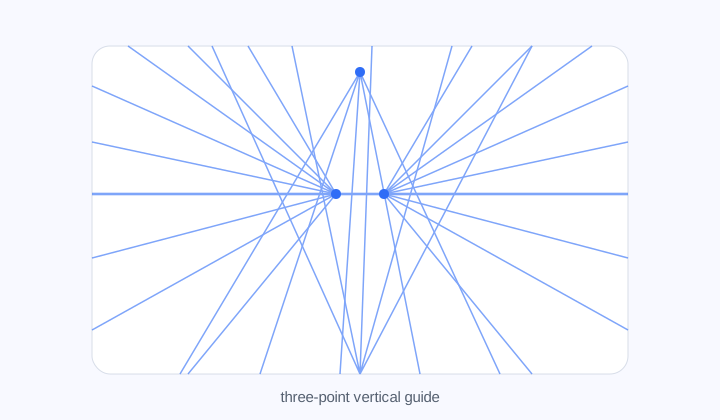
Tall buildings اور looking-up camera angles کے لیے third vanishing point والا layout۔
Perspective modes
1P straight depth دیتا ہے، 2P rotated objects اور city corners سنبھالتا ہے، 3P vertical drama شامل کرتا ہے۔
Guide density
Line density، vertical guides، opacity اور line width سے guide کو construction layer کی طرح readable رکھا جا سکتا ہے۔
Reusable output
SVG sharp اور editable رہتا ہے۔ Transparent PNG Procreate، Photoshop یا Clip Studio Paint میں overlay layer کی طرح رکھا جا سکتا ہے۔
Workflow
Camera angle طے کریں، horizon اور vanishing points set کریں، پھر overlay export کریں۔
Hallways، roads، rooms، shelves، tunnels اور ایک direction میں receding scenes کے لیے۔
Corners، boxes، city streets، furniture، vehicles، packaging اور rotated objects کے لیے۔
Vertical vanishing point tall buildings، dramatic interiors اور sharp up/down camera angles میں مدد کرتا ہے۔
ہاں۔ Transparent PNG overlay layer کی طرح رکھیں، یا SVG vector workflow میں use کریں۔
Rough sketch میں کم lines، architecture یا product sketch میں زیادہ lines رکھیں۔
نہیں، لیکن horizon اور vanishing point relationships visible کر کے practice میں مدد کرتا ہے۔